
Suno WAV Downloader
Choose your Suno tracks, download them as WAV — organised by workspace
A desktop app for Mac and Windows that downloads the Suno tracks you choose as high-quality WAV files, automatically sorted into a folder for each workspace. Search across your workspaces, tick the tracks you want, and let the app fetch them — no more saving songs one at a time. For music you made on your own Suno account.
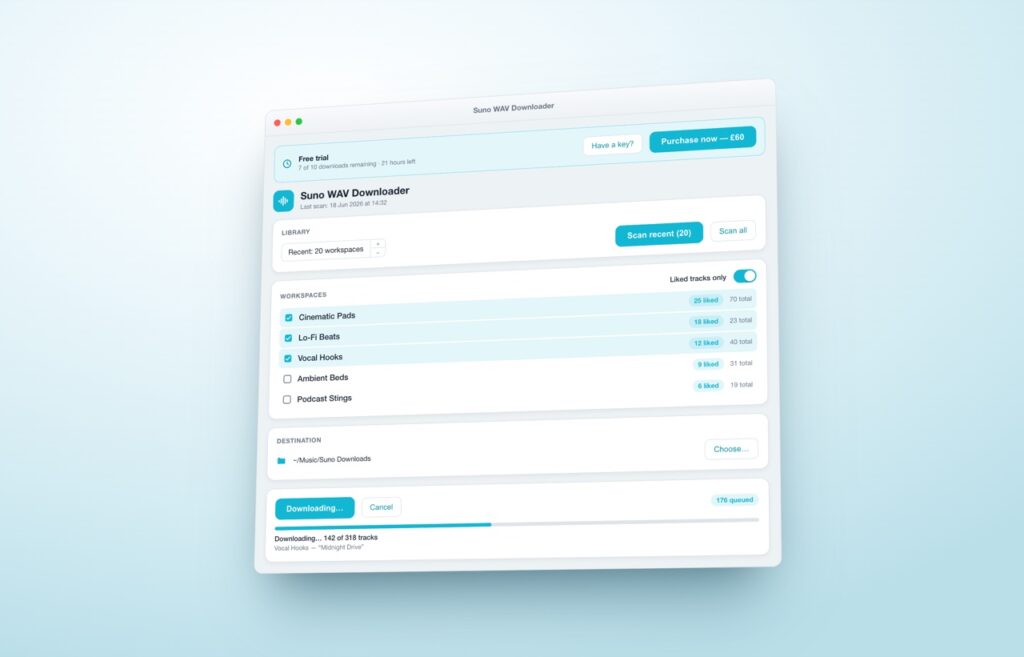
Pick your tracks, download them in one go
✓ Choose exactly the tracks you want — across every workspace
✓ Search your whole library by title
✓ Each workspace saved to its own folder, named to match
✓ Shows how many Suno downloads a run will use before it starts
✓ Unlocked tracks are free; files already in your folder are skipped
✓ Purpose-built, just you and your Suno songs — private, no data collection
Mac (macOS 13+) and Windows 10/11 · Suno Pro or Premier plan required · Uses your own Suno download allowance — it doesn’t bypass Suno’s limits (see FAQ). On your phone? Buy now and we’ll email your licence and installers.
What it does
Suno WAV Downloader scans the workspaces you choose and lists every track. Open a workspace and tick the tracks you want — or search your whole library — then download them as WAV files. Each workspace gets its own folder, named to match, so your library stays organised. Your music goes straight from Suno to your computer; nothing passes through any third-party server.
Features
Full-quality WAV downloads
Saves each track you choose as a true WAV file, straight from Suno — never a re-compressed copy.
Sorted by workspace
Each workspace downloads into its own folder, named to match, so your library stays tidy.
Private and direct
Your music goes straight from Suno to your Mac or PC. Nothing passes through any third-party server.
FAQ
Does it get around Suno’s download limits?
No. Since 3 September 2026 Suno limits downloads by plan (Free 7 in total, Pro 20 a month, Premier 60 a month). The app works through your own Suno account and uses your plan’s allowance — it can’t unlock or bypass anything. What it does is make every download count: it shows the cost before each run, marks tracks you’ve already unlocked as free, and skips files already in your folder, so you never spend a download twice.
How many devices can I use it on?
Up to 3 of your computers — Mac or Windows, any mix — with one licence. There’s a free trial so you can try it first.
What do I need to run it?
A Mac running macOS 13 or later, or a Windows 10/11 PC, plus your normal Suno login. You sign in inside the app exactly as you would on the Suno website — and no data passes through the app to any third party, including us.
Is it safe — and is it really just a Suno downloader?
Yes. The Mac version is signed and notarised by Apple, and the Windows version is signed with a Blue Sail Technologies Ltd code-signing certificate, so both open without warnings. It’s a pure Suno downloader — it does one thing: save your own Suno songs to your computer, and nothing else. No data is collected, and nothing passes through any server but Suno’s.
Which Suno plan do I need?
A Suno Pro or Premier plan. WAV download is a paid Suno feature, and your plan sets your monthly download allowance — see the first question above.
Questions before you buy?
Not sure it will work for your setup? Get in touch before you buy and we will be happy to help.